
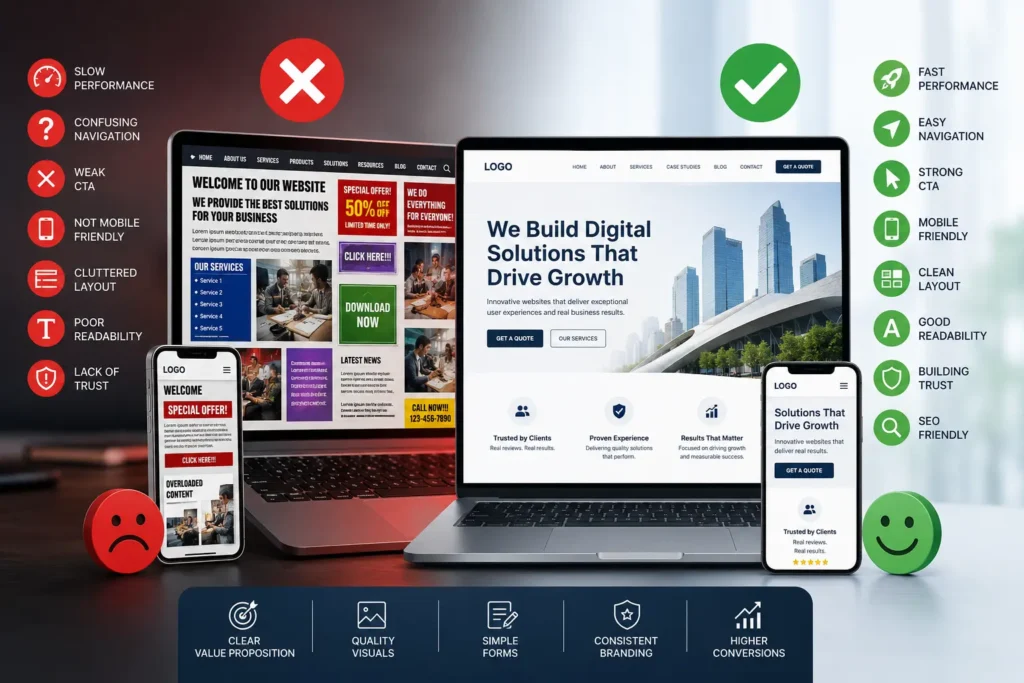
A website is often the first point of contact between a business and its potential customers. Within just a few seconds, visitors form opinions about your brand based on the appearance, functionality, and usability of your site. While many businesses invest heavily in marketing to attract traffic, they frequently overlook the importance of a conversion-focused website design. Applying proven landing page design tips to improve conversion rates alongside strong website design principles can significantly increase the likelihood of turning visitors into qualified leads and customers.
Even if your website looks visually appealing, poor design decisions can stop visitors from taking action. Issues such as confusing navigation, slow page speed, weak messaging, or poor mobile usability can drive users away before they become customers.
In this article, we’ll discuss some of the most common website design mistakes that negatively affect conversions and explore practical ways to improve user experience and business performance.
Slow Website Performance
Website speed plays a major role in user satisfaction and conversion rates. Online users expect pages to load quickly, and delays often cause them to leave before interacting with your content. Understanding why optimizing website speed is necessary can help businesses improve user experience, reduce bounce rates, and increase overall conversions.
Why Slow Websites Hurt Conversions
- Visitors lose patience quickly
- Bounce rates increase
- User engagement decreases
- Search engine rankings suffer
- Brand credibility weakens
Common Reasons for Slow Loading
- Large image files
- Excessive plugins and scripts
- Weak hosting infrastructure
- Heavy animations and effects
- Poorly optimized coding
Ways to Improve Website Speed
- Compress and optimize images
- Use reliable web hosting
- Remove unnecessary scripts
- Enable browser caching
- Optimize CSS and JavaScript files
A faster website improves the overall user experience and helps businesses generate more leads and sales.
Difficult Website Navigation
Users should be able to find information quickly and easily. If visitors struggle to navigate your website, they are more likely to leave without completing any action. Understanding the effect of poor website navigation can help businesses identify usability issues that reduce engagement, increase bounce rates, and ultimately hurt conversions.
Signs of Poor Navigation
- Overloaded menus
- Confusing page labels
- Important pages hidden from view
- Inconsistent menu structures
- Missing search functionality
Navigation Best Practices
- Keep menu structures simple
- Use clear navigation labels
- Highlight essential pages
- Create mobile-friendly menus
- Include easy-to-access navigation tools
An intuitive navigation system encourages visitors to stay longer and explore your services more effectively.
Ineffective Calls-to-Action
A website should guide users toward taking specific actions. Weak or poorly placed calls-to-action (CTAs) often result in missed conversion opportunities.
Common CTA Mistakes
- Generic button text
- Hard-to-find CTA placement
- Too many competing buttons
- Poor button visibility
- Lack of urgency
Strong CTA Examples
- “Request a Free Consultation”
- “Start Your Project”
- “Get a Custom Quote”
- “Contact Our Experts”
Tips for Better CTAs
- Use action-focused wording
- Place CTAs strategically
- Use contrasting button colors
- Repeat CTAs naturally throughout pages
Clear and compelling CTAs help direct visitors toward becoming customers.
Poor Mobile Optimization
A large percentage of internet traffic now comes from mobile devices. Websites that fail to deliver a smooth mobile experience risk losing a significant number of users.
Problems Caused by Non-Responsive Design
- Text becomes difficult to read
- Buttons are hard to tap
- Layouts break on smaller screens
- Navigation becomes frustrating
- Mobile loading times increase
Mobile-Friendly Design Tips
- Use responsive layouts
- Optimize content for mobile screens
- Simplify page structures
- Ensure touch-friendly buttons
- Test the site on multiple devices
A responsive website ensures users enjoy a seamless experience across desktops, tablets, and smartphones.
Overcrowded Page Layouts
Too much information on a single page can overwhelm visitors and distract them from important actions.
Common Clutter Issues
- Large blocks of text
- Too many visual elements
- Excessive animations
- Poor use of spacing
- Inconsistent layouts
Why Clean Design Matters
Simple and organized layouts make it easier for users to focus on key information and understand your message quickly.
How to Simplify Your Design
- Use white space effectively
- Organize content into sections
- Prioritize important elements
- Remove unnecessary distractions
- Maintain consistent styling
Minimalist designs often create a more professional and user-friendly experience.
Poor Typography and Readability
Content is only effective when users can read it comfortably. Typography has a direct impact on engagement and usability.
Typography Mistakes to Avoid
- Tiny font sizes
- Decorative or hard-to-read fonts
- Low contrast text colors
- Long paragraphs
- Inconsistent text formatting
Readability Improvements
- Use modern, readable fonts
- Break content into shorter paragraphs
- Include headings and bullet points
- Maintain proper spacing
- Ensure strong color contrast
- Follow website accessibility guidelines to make content easier to use for people with different accessibility needs
Better readability helps users absorb information faster and improves interaction rates.
Missing Trust Indicators
Visitors are less likely to convert if your website lacks credibility. Trust signals help reassure users that your business is reliable and professional.
Examples of Trust Signals
- Customer reviews
- Testimonials
- Case studies
- Secure payment badges
- Business contact details
- Client logos and partnerships
Importance of Building Trust
Trust reduces hesitation and increases confidence in your products or services, making visitors more likely to take action.
Adding authentic social proof and professional branding can significantly improve conversion rates.
Low-Quality Visual Content
Images and visuals strongly influence how users perceive your brand. Poor-quality visuals can make even a good business appear unprofessional.
Common Visual Mistakes
- Blurry or pixelated images
- Overused stock photos
- Inconsistent image styles
- Oversized media files
- Irrelevant graphics
Better Visual Strategies
- Use high-resolution images
- Optimize media for faster loading
- Showcase real projects and teams
- Maintain visual consistency
- Use branding-focused graphics
Professional visuals create stronger engagement and help establish trust.
Ignoring SEO in Website Design
A well-designed website should also be optimized for search engines. Without SEO-friendly design practices, it becomes harder for users to discover your business online.
Common SEO Design Problems
- Slow-loading pages
- Poor mobile performance
- Missing heading structures
- Broken links
- Unoptimized images
- Weak page architecture
SEO-Friendly Design Practices
- Improve website speed
- Structure content properly
- Create clean URLs
- Optimize images
- Focus on mobile usability
Combining SEO with effective design improves visibility, traffic, and conversions.
Complicated Inquiry Forms
Long or confusing forms often discourage users from submitting inquiries or requests.
Mistakes Businesses Make
- Asking for unnecessary information
- Using unclear field labels
- Poor mobile form design
- Lack of confirmation messages
- Complex layouts
How to Improve Forms
- Keep forms short and simple
- Request only essential details
- Use clear instructions
- Ensure mobile compatibility
- Provide instant confirmation
User-friendly forms help increase lead submissions and customer inquiries.
Inconsistent Brand Identity
A website should present a unified brand image. Inconsistency in colors, fonts, or messaging can confuse users and reduce trust.
Branding Problems
- Mixed font styles
- Different color schemes across pages
- Unclear messaging
- Inconsistent visuals
- Poor logo positioning
Benefits of Consistent Branding
- Strengthens brand recognition
- Builds professionalism
- Improves customer trust
- Creates a memorable experience
A cohesive brand identity helps businesses stand out in competitive markets.
Unclear Value Proposition
Visitors should immediately understand what your business offers and why they should choose you.
Weak Messaging Examples
- Generic headlines
- Vague service descriptions
- Too much technical jargon
- Lack of customer-focused benefits
Creating a Strong Value Proposition
- Explain services clearly
- Focus on customer outcomes
- Highlight unique strengths
- Use concise messaging
A clear value proposition keeps visitors engaged and encourages further interaction.
Excessive Pop-Ups and Interruptions
Pop-ups can support lead generation, but excessive use often frustrates visitors and damages the user experience.
Problems with Too Many Pop-Ups
- Interrupt browsing
- Increase bounce rates
- Create mobile usability issues
- Annoy users
Smarter Pop-Up Usage
- Use exit-intent pop-ups
- Limit pop-up frequency
- Offer genuine value
- Make closing easy
Using pop-ups strategically helps maintain user engagement without creating frustration.
The Importance of Conversion-Oriented Website Design
An effective website should do more than simply look attractive. It should guide users smoothly toward taking meaningful actions, such as contacting your business, requesting a quote, or making a purchase. Following a structured website design project workflow can help businesses ensure that each stage of the design process—from planning and user experience to development and testing—supports their conversion goals.
Conversion-focused design combines:
- Strong user experience
- Clear messaging
- Fast performance
- Responsive layouts
- Effective CTAs
- SEO optimization
Businesses that invest in optimized website design often benefit from:
- Increased leads
- Better customer engagement
- Higher sales conversions
- Improved online credibility
- Stronger search visibility
Conclusion
Website design has a direct influence on user behavior and business growth. Small design flaws can negatively impact conversions, customer trust, and overall performance. By avoiding issues such as slow loading speeds, cluttered layouts, poor navigation, and weak calls-to-action, businesses can create websites that not only attract traffic but also convert visitors into loyal customers.
A successful website balances aesthetics, usability, functionality, and strategy to deliver the best possible experience for users. Before publishing any new or redesigned site, it’s also worth following a comprehensive website design checklist before launch to verify that every critical element—from performance and mobile responsiveness to SEO and usability—is fully optimized before going live.
If your business is looking to improve website performance and build a more conversion-focused online presence, partnering with experienced professionals can make a significant difference. Horizon Services, a trusted website design and development agency in watford, provides tailored digital solutions focused on creating modern, user-friendly, and results-driven websites.


