
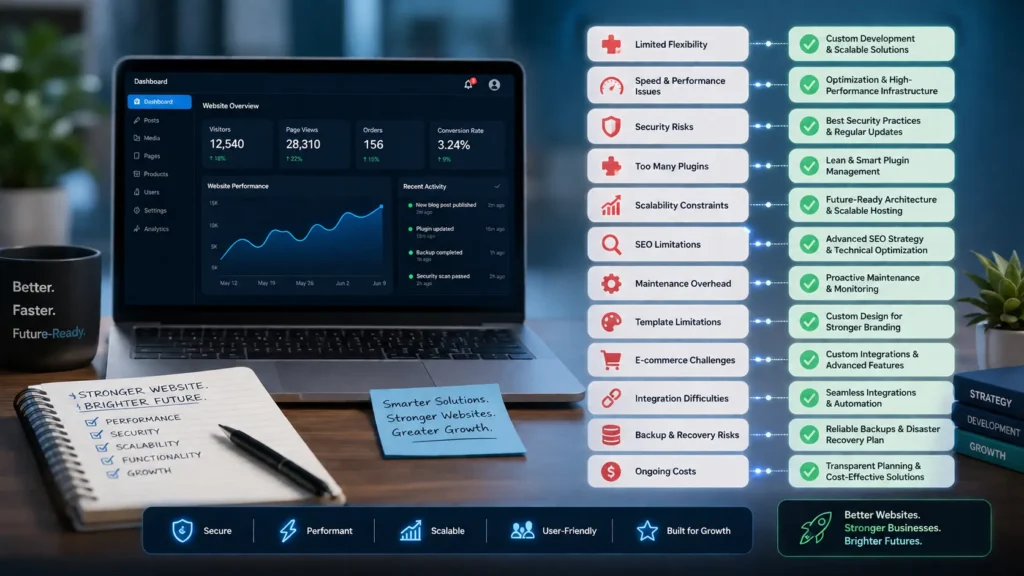
A Content Management System (CMS) has become the foundation of modern website development. Whether you’re running a business website, blog, portfolio, or online store, platforms such as WordPress, Drupal, Joomla, Shopify, Wix, and Squarespace allow you to build and manage digital content without extensive programming knowledge.
Their ease of use, affordability, and extensive ecosystems of themes and plugins make them a popular choice for organizations of all sizes. However, selecting right CMS platform is just as important as choosing to use a CMS in the first place, since the wrong choice can lead to performance, security, and scalability challenges as your business grows. While CMS platforms simplify website management, they also present several technical and operational challenges that can affect long-term growth.
As your business expands, your website may require greater flexibility, stronger security, faster performance, and more advanced functionality than a standard CMS can provide out of the box.
This guide explores the most common limitations businesses encounter with CMS platforms and outlines practical solutions to address them.
The Growing Popularity of CMS Platforms
CMS solutions have transformed website management by making publishing and updating content accessible to non-technical users. Instead of relying on developers for every minor website change, businesses can manage pages, blogs, images, and products through an intuitive dashboard.
Some of the primary advantages include:
- User-friendly content management
- Faster website deployment
- Thousands of themes and extensions
- Lower initial development costs
- Easy collaboration between team members
- Strong developer communities
- Flexible website management
Although these benefits make CMS platforms attractive, they also come with limitations that become more noticeable as business requirements evolve.
Limited Flexibility for Custom Features
CMS platforms are designed to accommodate a wide variety of users, meaning they provide generalized functionality rather than solutions tailored to a specific business.
When organizations need unique workflows, custom dashboards, or industry-specific tools, they often discover that available plugins cannot fully meet their requirements.
Typical Challenges
- Limited design freedom
- Generic functionality
- Plugin incompatibilities
- Difficulty implementing unique business processes
Trying to force a CMS into handling complex custom requirements often results in unstable websites and complicated maintenance.
Recommended Solution
Instead of depending on multiple third-party plugins, invest in custom development where necessary. Understanding the benefits of custom website development can help businesses make informed decisions when a CMS no longer meets their evolving needs. A professionally developed theme or bespoke functionality provides better reliability, greater flexibility, and improved long-term scalability.
Other best practices include:
- Building custom templates
- Developing proprietary modules
- Selecting a CMS with developer-friendly architecture
- Avoiding unnecessary feature overload
Website Speed and Performance Issues
Website speed has become one of the most important ranking and user experience factors. Unfortunately, CMS websites frequently slow down as more plugins, media files, and database records accumulate.
Large websites may experience delays in loading pages, affecting visitor engagement and search visibility.
Common Reasons for Slow Performance
- Excessive plugins
- Poor-quality themes
- Large image files
- Bloated databases
- Inefficient hosting environments
- Unoptimized scripts
A slow website can reduce customer satisfaction while negatively impacting SEO and the effectiveness of website features that increase conversions, such as lead generation forms, clear calls to action, and streamlined checkout experiences.
Ways to Improve Performance
Businesses can significantly improve loading times by:
- Choosing high-performance hosting
- Enabling browser and server caching
- Compressing images before uploading
- Removing unused plugins
- Optimizing databases regularly
- Minifying CSS and JavaScript
- Using a Content Delivery Network (CDN)
Performance optimization should be viewed as an ongoing process rather than a one-time improvement.
Increased Security Risks
Since many CMS platforms power millions of websites worldwide, they naturally attract cybercriminals looking to exploit vulnerabilities.
Outdated software and insecure plugins are among the leading causes of website breaches.
Common Security Concerns
- Malware infections
- Brute-force login attempts
- SQL injection attacks
- Cross-site scripting (XSS)
- Vulnerable plugins
- Weak administrator passwords
Without regular monitoring, even small security issues can escalate into major business disruptions.
Best Practices
Reduce security risks by:
- Installing updates promptly
- Removing inactive plugins and themes
- Using multi-factor authentication
- Creating strong password policies
- Deploying website firewalls
- Scheduling regular malware scans
- Maintaining verified backups
Strong cybersecurity practices protect both your website and your customers’ data.
Heavy Reliance on Plugins
Plugins extend the capabilities of a CMS, but using too many can create maintenance headaches.
While adding a plugin may solve an immediate problem, excessive dependence often leads to compatibility conflicts, slower websites, and increased security risks.
Potential Drawbacks
- Software conflicts after updates
- Reduced website speed
- Greater maintenance requirements
- Unsupported or abandoned plugins
Managing dozens of plugins also makes troubleshooting significantly more difficult.
Smarter Approach
Perform routine plugin reviews to identify extensions that are no longer necessary.
Whenever practical:
- Replace multiple plugins with custom solutions
- Use reputable developers
- Keep only actively maintained plugins
- Eliminate duplicate functionality
Maintaining a lean plugin environment contributes to better stability and easier maintenance.
Scalability Constraints
A CMS that performs well for a small company website may struggle when traffic, products, or content volumes increase substantially.
Growing businesses often introduce new requirements such as customer portals, multilingual content, mobile applications, or enterprise software integrations.
Signs Your Website Has Outgrown Its CMS Setup
- Slower response times
- Server resource limitations
- Difficult content management
- Complex administrative workflows
Scaling Successfully
To prepare for future growth:
- Upgrade hosting infrastructure
- Optimize database performance
- Implement advanced caching
- Separate frontend and backend using headless architecture where appropriate
- Plan scalable infrastructure from the beginning
Proper planning helps avoid expensive migrations later.
Built-In SEO Isn’t Always Enough
Although most CMS platforms include basic SEO settings, achieving strong search engine visibility requires more than installing an SEO plugin.
Technical optimization remains essential.
Common SEO Obstacles
- Duplicate pages
- Slow loading times
- Weak internal linking
- Missing structured data
- Poor URL organization
- Crawl inefficiencies
Ignoring these issues may reduce organic traffic over time.
Improving Search Performance
Develop a comprehensive SEO strategy that includes:
- Fast-loading pages
- Optimized metadata
- Schema markup
- Logical site architecture
- XML sitemaps
- Broken-link monitoring
- Consistent internal linking
Combining technical SEO with quality content produces better long-term results.
Continuous Maintenance Requirements
Unlike static websites, CMS platforms require frequent updates to remain secure and efficient.
Maintenance extends beyond simply clicking the update button.
Regular Maintenance Tasks
- Core CMS updates
- Plugin upgrades
- Theme compatibility testing
- Database optimization
- Backup verification
- Performance monitoring
- Security audits
Failing to perform routine maintenance increases the likelihood of downtime and security issues.
Recommended Strategy
Establish a scheduled maintenance plan or partner with professionals who can proactively monitor and manage your website.
Routine maintenance protects your investment while reducing unexpected technical problems.
Template-Based Designs Can Limit Branding
Many businesses launch websites using ready-made themes because they’re affordable and quick to implement.
However, template-based designs often resemble thousands of other websites, making it difficult to establish a memorable brand identity.
Common Design Limitations
- Generic page layouts
- Limited customization
- Inconsistent branding
- Average user experience
Creating a Stronger Brand Presence
A custom-designed website allows you to:
- Reflect your brand personality
- Improve usability
- Create unique customer journeys
- Increase credibility
- Stand out from competitors
Investing in tailored design often delivers long-term marketing benefits.
E-commerce Complexity
While many CMS platforms support online selling, expanding e-commerce operations often introduces technical challenges.
Businesses may require features such as:
- Subscription billing
- Multi-location inventory
- Advanced shipping rules
- ERP integration
- Customer-specific pricing
- Marketplace functionality
These capabilities frequently require significant customization.
Overcoming the Challenge
Consider combining your CMS with:
- Enterprise-grade plugins
- Custom API development
- Scalable hosting
- Performance optimization
- Tailored checkout experiences
The right development approach ensures your online store can grow alongside your business.
Difficulties Integrating Business Software
Modern businesses rarely operate using a website alone. They often rely on customer relationship management systems, marketing platforms, accounting software, and other business applications.
Unfortunately, not every CMS integrates smoothly with these tools.
Typical Integration Issues
- Data synchronization problems
- Limited API support
- Manual workflows
- Plugin incompatibilities
Effective Solutions
Professional developers can build secure integrations that automate processes and eliminate repetitive tasks.
Well-planned integrations improve efficiency while reducing operational errors.
Backup and Recovery Challenges
Many website owners assume backups are automatically handled by their hosting provider. Unfortunately, this assumption can become costly after accidental data loss or cyberattacks.
Potential Risks
- Hardware failures
- Human mistakes
- Malware infections
- Accidental file deletion
- Ransomware attacks
Protecting Your Website
Implement a reliable disaster recovery strategy that includes:
- Automated daily backups
- Offsite backup storage
- Routine restoration testing
- Backup version management
- Emergency recovery procedures
A dependable backup strategy minimizes downtime during unexpected incidents.
Ongoing Ownership Costs
Although CMS platforms are often marketed as affordable solutions, the total cost of ownership can increase considerably over time.
Recurring expenses commonly include:
- Premium themes
- Commercial plugins
- Managed hosting
- Website maintenance
- Security software
- Performance optimization
- Technical support
Planning for these costs helps prevent budget surprises.
Selecting the Right CMS Approach
Every business has unique requirements, so there is no universal CMS solution.
Before selecting a platform, evaluate factors such as:
- Future business growth
- Required custom functionality
- Integration needs
- Expected traffic volume
- Internal technical expertise
- Maintenance resources
It is also important to understand the Pros and cons of CMS vs custom websites before making a long-term decision, as the right choice depends on your scalability requirements, branding goals, budget, and the level of customization your business needs. Likewise, choosing the appropriate technology for your business website is a critical part of the decision-making process, as selecting the right technology stack from the outset can improve performance, simplify future scalability, and reduce redevelopment costs. Choosing a scalable solution today helps your website support long-term business growth while minimizing future expenses.
Conclusion
Content Management Systems have made professional website development more accessible than ever before. However, their convenience should not overshadow their limitations. As websites grow, businesses often encounter challenges related to customization, performance, security, scalability, and ongoing maintenance.
The good news is that these obstacles can be addressed with the right strategy. Investing in custom development, technical optimization, proactive maintenance, and expert support enables businesses to get the most from their CMS while preparing for future growth.
Ready to Build a High-Performance Website?
If you’re looking to overcome the limitations of your current CMS or want a website that’s secure, scalable, and tailored to your business goals, Horizon Services can help. As a Watford-based full-service digital agency, we specialize in custom web solutions, CMS development, performance optimization, and ongoing website support.
Explore our website design and development company in Watford services to discover how we can create a website that grows with your business while delivering exceptional user experiences and long-term results.


