
In today’s digital landscape, users form opinions about a website or app within moments. That first impression determines whether they continue engaging or abandon the product entirely. More often than not, that decision is influenced by UI (User Interface) and UX (User Experience) design.
A visually attractive product is no longer sufficient on its own. It must also be intuitive, easy to navigate, fast-loading, accessible, and designed around real user behavior and expectations.
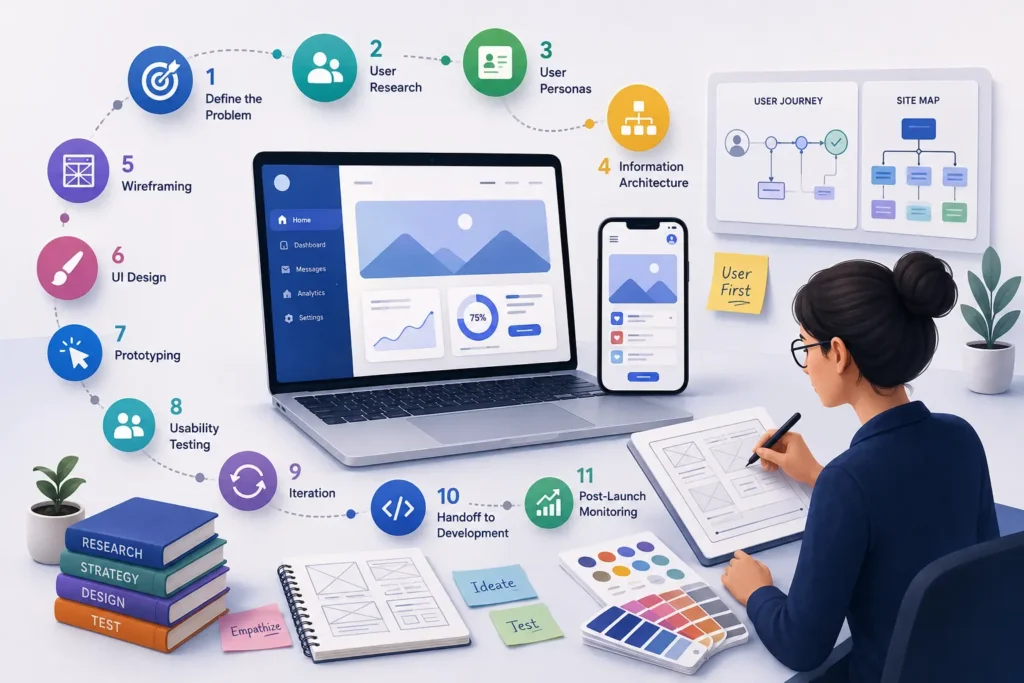
To achieve this, teams rely on a structured UI/UX design workflow that transforms ideas into functional, user-centered digital products that perform well in real-world conditions.
Let’s explore the complete step-by-step UI/UX design process used to create successful digital experiences.
Defining the Problem and Aligning Business Objectives
Every effective design journey begins with clarity. Before any sketches or prototypes are created, it is important to establish a solid understanding of the project goals.
Key questions include:
- What challenge are we trying to solve?
- Who are the target users?
- What does success look like for the business?
This stage typically involves discussions with stakeholders, reviewing competitors, and analyzing existing product data if available. Designers and business teams collaborate closely to ensure user needs align with organizational goals.
Without this alignment, even the most visually impressive design may fail to deliver meaningful results.
Conducting User Research to Understand Behavior
User research is a foundational pillar of UX design. Instead of relying on assumptions, designers collect real-world insights to guide decisions.
Common research methods include:
- Online surveys
- One-on-one user interviews
- Behavioral analytics tools
- Competitor usability evaluations
- Heatmaps and user session recordings
The objective is to understand user expectations, frustrations, goals, and digital habits.
For instance, users of a banking app may prioritize security and clarity, while users of an online store may value speed and simplicity above all else.
Empathy-driven design always begins with understanding the user deeply.
Building User Personas for Better Decision-Making
After gathering research data, designers organize it into structured user personas. These personas represent key audience segments based on real insights rather than guesswork.
A typical persona includes:
- Demographic information
- Professional background
- User goals and motivations
- Pain points and challenges
- Device and platform preferences
These personas act as reference points throughout the design process, helping teams stay focused on real user needs rather than internal assumptions.
Designing Information Architecture for Clear Navigation
Information Architecture (IA) focuses on organizing content in a logical and user-friendly manner. The goal is to ensure users can easily locate what they need without confusion.
This step involves:
- Structuring site maps
- Defining navigation menus
- Organizing content hierarchy
- Mapping user journeys
Strong IA reduces friction and improves usability. When users can navigate effortlessly, engagement and satisfaction naturally increase.
Creating Wireframes as the Structural Blueprint
Wireframes are simplified, low-detail layouts that represent the structure of a digital product. At this stage, visual styling is intentionally kept minimal.
Wireframes help answer critical questions such as:
- Where should key elements be positioned?
- How will users move between screens?
- What content should be prioritized?
They serve as a blueprint for the final design, enabling quick feedback and easy modifications before investing time in visual design.
Designing the User Interface (UI) for Visual Impact
Once the structure is approved, the process transitions into UI design, where the product begins to take its visual form.
This phase includes:
- Selecting color schemes aligned with branding
- Defining typography systems
- Creating icons and visual elements
- Refining spacing and layout
- Ensuring design consistency across screens
The goal is to create an interface that is both aesthetically pleasing and functionally efficient. Good UI design subtly guides users through the experience without overwhelming them.
Every visual element should contribute to clarity and usability.
Developing Interactive Prototypes
A prototype is an interactive model of the product that simulates real user interactions. It bridges the gap between static design and functional development.
Prototypes allow stakeholders to:
- Click through workflows
- Experience navigation flows
- Detect usability issues early
- Validate design assumptions
This step significantly reduces risks by allowing teams to test concepts before actual coding begins.
Performing Usability Testing with Real Users
Usability testing involves observing real users as they interact with the prototype. This helps identify friction points that may not be obvious during the design phase.
During testing, designers look for:
- Confusing navigation patterns
- Difficult or unclear interactions
- Broken or inefficient user flows
- Visual inconsistencies
The feedback collected is extremely valuable and often leads to meaningful improvements that enhance overall user satisfaction.
Refining the Design Through Iteration
Design is rarely perfect in the first attempt. Based on usability feedback, teams revisit and refine the product.
This may include:
- Improving layout clarity
- Simplifying complex flows
- Enhancing readability and accessibility
- Adjusting UI elements for better usability
Iteration ensures the product becomes more polished, intuitive, and user-friendly with each cycle.
Handoff to Development Team
After finalizing the design, it is handed over to developers for implementation.
A proper design handoff typically includes:
- Detailed design specifications
- Style guides and design systems
- Exported assets (icons, images, SVGs)
- Interaction and animation guidelines
- Responsive behavior instructions
Collaboration between designers and developers is crucial to ensure the final product matches the intended design vision.
Post-Launch Monitoring and Continuous Improvement
UI/UX design continues even after the product goes live. Real-world usage provides valuable insights into how users interact with the product.
Teams monitor:
- User engagement metrics
- Bounce and exit rates
- Conversion performance
- Drop-off points in user journeys
- Customer feedback and reviews
These insights help identify opportunities for continuous improvement. The product evolves over time based on actual user behavior and market expectations.
Why a Structured UI/UX Workflow is Essential
A well-defined design process is more than just a workflow—it is a strategic approach to building successful digital products.
Businesses that prioritize UI/UX design often experience:
- Improved conversion rates
- Higher user retention
- Stronger brand credibility
- Reduced product development risks
- Better overall customer satisfaction
These benefits clearly demonstrate the impact of UI/UX design on conversion rates, showing how thoughtful design not only enhances user satisfaction but also contributes directly to business growth. Likewise, avoiding common UI/UX design mistakes that can hurt business revenue is equally important, as poor usability, confusing navigation, and inconsistent interfaces can drive users away, reduce conversions, and negatively affect long-term business performance.
In competitive markets, user experience often becomes the key differentiator between success and failure.
Partner with Experts for High-Impact Digital Experiences
Creating a truly effective digital product requires experience, strategy, and deep understanding of user behavior. Working with skilled professionals ensures your product is not only visually appealing but also optimized for performance and usability.
If you are planning to design or improve a digital product, you can collaborate with Horizon Services, a full-service digital agency specializing in modern UI/UX design solutions.
Their team focuses on crafting user-centric experiences that improve engagement, usability, and business performance.
To bring your ideas to life, you can choose to hire UI/UX designers who understand both design thinking and real-world product goals.
Conclusion
A structured UI/UX design process transforms abstract ideas into meaningful, high-performing digital products. From research and planning to testing and optimization, every stage plays a crucial role in shaping user experience.
As user expectations continue to evolve, businesses that stay informed about the latest UI/UX design trends that boost user engagement while understanding why investing in UI/UX design services is necessary consistently outperform competitors by delivering intuitive, user-centric digital experiences that drive engagement, loyalty, and long-term growth.
Ultimately, great digital products are not just visually appealing—they are seamless, intuitive, and built around real human needs.


